ChatGPT image prompt
Turn your photo into Minecraft
You stay photoreal. Everything behind you turns to blocks. Copy the prompt, paste it into ChatGPT with your photo.
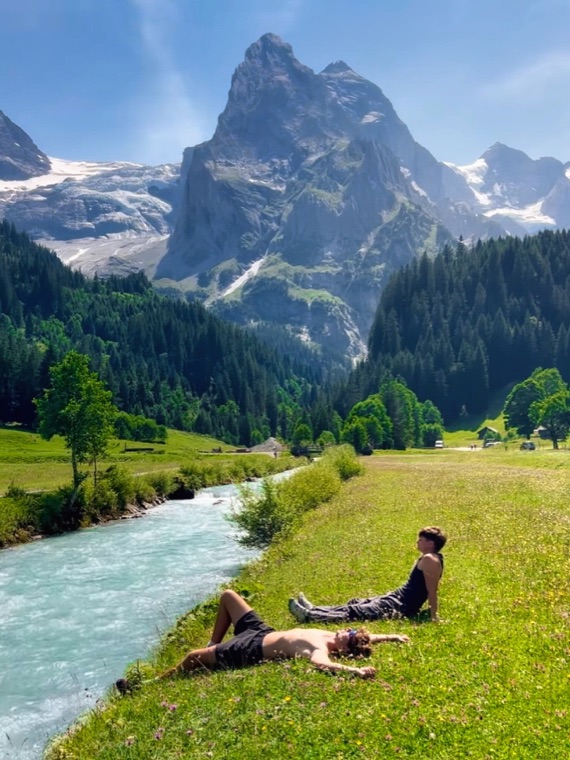
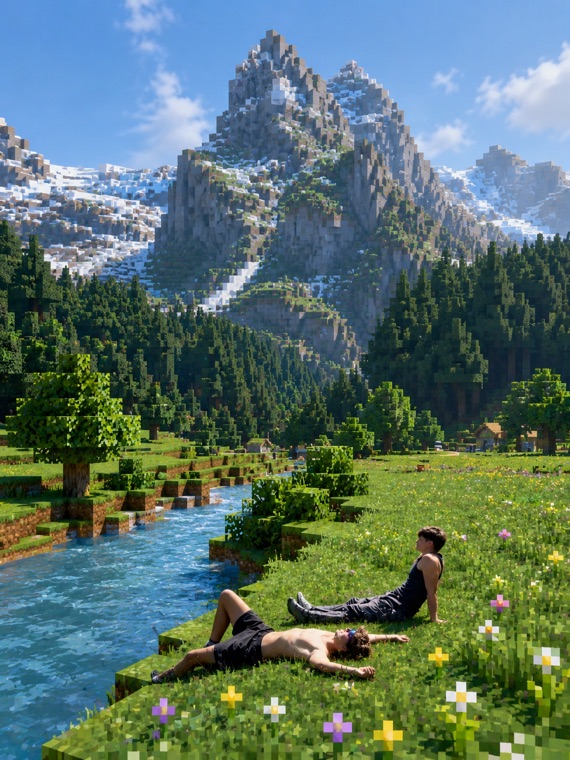
- Open ChatGPT and start a new image chat.
- Upload the photo you want to transform.
- Tap Copy prompt below, paste it in, and send.
The prompt
cleaned JSON · works as-is
{
  "task": "image_transformation",
  "style": {
    "overall_aesthetic": "High-quality cinematic Minecraft screenshot.",
    "rendering_technique": "Mixed-media: Photorealistic subject embedded in a voxel-based environment."
  },
  "subject_rules": {
    "main_subject": "The human person from the reference image must remain completely photorealistic and unchanged. No pixelation or block filters on their body, clothing, or face.",
    "interacting_objects": "CRITICAL: Any non-human object in direct physical contact with the subject, or nearby pets such as dogs, MUST be converted into Minecraft block models or mobs. A real dog becomes a Minecraft wolf."
  },
  "environment_rules": {
    "background_analysis": "Analyze the reference image background structure and recreate it entirely out of Minecraft voxel blocks.",
    "elements": "Trees, terrain, paths, and foliage must be cubic blocks with pixel art textures.",
    "atmosphere": "Replicate the foggy forest atmosphere using blocky volumetric fog layers appropriate for Minecraft."
  },
  "composition_and_lighting": {
    "camera": "Maintain the exact camera angle and framing from the reference photo.",
    "lighting": "Minecraft daylight with gentle haze and consistent block-based shadows."
  }
}